OpenSCAD Variable Scope: Why x = x + 1 Doesn't Work in a Loop
In OpenSCAD, x = x + 1 inside a for loop does not update a running total. Each loop iteration and each { } block gets its own scope, where a variable has exactly one value. The assignment creates a new local x; nothing carries over to the next iteration or back out of the loop. Instead of accumulating, compute the value you need: a list comprehension, a recursive function, a let() binding, or a module parameter.
The accumulator that does not work
This should place four blocks of a tool tray in a row: widths 10, 20, 15 and 25 mm with a 5 mm gap. The loop tries to move x forward after each block.
widths = [10, 20, 15, 25];
gap = 5;
x = 0;

for (i = [0 : len(widths) - 1]) {
  translate([x, 0, 0]) cube([widths[i], 12, 8]);
  x = x + widths[i] + gap;
  echo(i = i, x = x);
}
echo(after_loop = x);
Open the broken version in the playground
The playground's console prints:
ECHO: i = 0, x = 15
ECHO: i = 1, x = 25
ECHO: i = 2, x = 20
ECHO: i = 3, x = 30
ECHO: after_loop = 0
Two things went wrong, and OpenSCAD gives no warning for either:
- The right-hand
xis always the outerx = 0. Each iteration computes0 + widths[i] + 5, so the values are 15, 25, 20 and 30, not a running sum. After the loop, the top-levelxis still0. - The block is not drawn at the old position either. Inside the loop body, the local
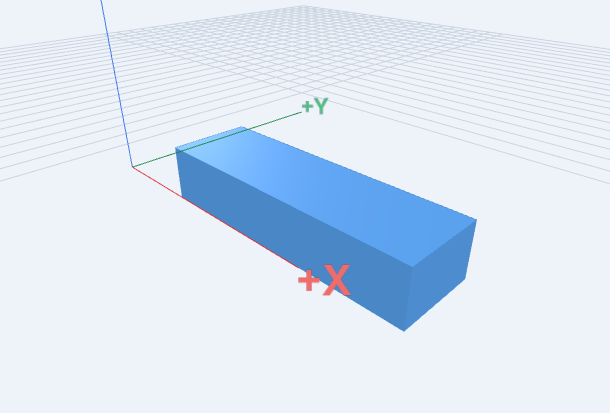
xhas its single value for the whole block, including thetranslate()written before the assignment. The blocks land at X = 15, 25, 20 and 30 and overlap. The rendered part spans X 15 to 55, and its volume is 3,840 mm³ instead of the 6,720 mm³ of four separate blocks.
Fix 1: compute running offsets with a list comprehension
Build all the start positions as one list. A C-style list comprehension carries x from one step to the next, which is the one place OpenSCAD supports this pattern.
widths = [10, 20, 15, 25];
gap = 5;

// Running start positions: [0, 15, 40, 60]
offsets = [for (i = 0, x = 0; i < len(widths); x = x + widths[i] + gap, i = i + 1) x];
total_length = offsets[len(widths) - 1] + widths[len(widths) - 1];
echo(offsets = offsets, total_length = total_length);

for (i = [0 : len(widths) - 1])
  translate([offsets[i], 0, 0]) cube([widths[i], 12, 8]);
Open the fixed row in the playground
Console output:
ECHO: offsets = [0, 15, 40, 60], total_length = 85
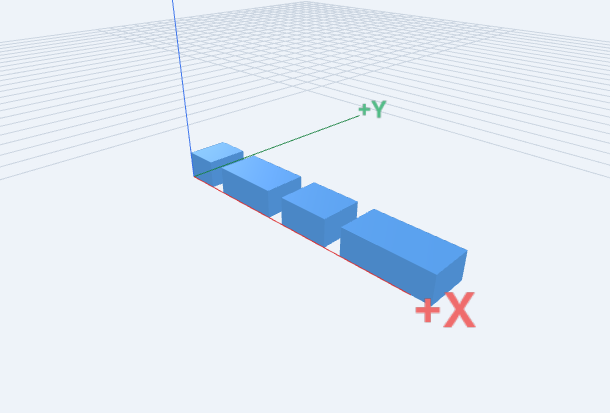
The four blocks no longer touch, and the part spans X 0 to 85, Y 0 to 12 and Z 0 to 8, with a volume of 6,720 mm³. Because total_length is a named value, you can reuse it, for example to size a base plate under the row.
Fix 2: a recursive function, let() and module parameters
If you prefer computing one position at a time, write a function that depends only on its inputs. Use let() to name the result inside the loop, and pass it to a module as a parameter instead of trying to change an outer variable.
widths = [10, 20, 15, 25];
gap = 5;

function start_of(i) = i == 0 ? 0 : start_of(i - 1) + widths[i - 1] + gap;

module block(w, x, height = 8) {
  echo(w = w, x = x);
  translate([x, 0, 0]) cube([w, 12, height]);
}

for (i = [0 : len(widths) - 1])
  let(x = start_of(i))
    block(widths[i], x);
Open the module version in the playground
Each call echoes its own parameters: w = 10, x = 0, w = 20, x = 15, w = 15, x = 40 and w = 25, x = 60. The geometry matches Fix 1 exactly: the same 85 mm span and 6,720 mm³ volume. The recursion depth equals the block count, which is fine for typical parts; for hundreds of items, the list comprehension in Fix 1 is simpler.
if blocks have their own scope too
The same rule catches conditional dimensions. Setting a variable inside if does not change it outside:
heavy_duty = true;
wall = 2;

if (heavy_duty) {
  wall = 4;
  echo(inside_if = wall);
}
echo(after_if = wall);
cube([30, 20, wall]);
This prints inside_if = 4 and then after_if = 2, and the plate is only 2 mm thick. Choose the value with a conditional expression instead:
heavy_duty = true;
wall = heavy_duty ? 4 : 2;
echo(wall = wall);
cube([30, 20, wall]);
Now it prints wall = 4, and the plate is 4 mm thick (Z 0 to 4).
Reassigning in the same scope: last one wins
At the top level, a second assignment to the same name replaces the first for the whole file, even code above it. This time OpenSCAD does warn:
WARNING: "size" was assigned on line 1 of "/project/main.scad"
but was overwritten in file /project/main.scad, line 3
The variables step of the interactive tutorial walks through this case. Give a derived value a new name instead, such as inner = width - 2 * wall;.
All examples were run with the playground's OpenSCAD 2025.01.19 WASM engine (Manifold 3.0.1). The echo lines, the absence of a warning in the loop and if cases, and the bounds quoted above come from those renders.
Related guides
- Interactive OpenSCAD tutorial: name dimensions with variables
- Interactive OpenSCAD tutorial: repeat shapes with a for loop
- How to make a circular hole pattern in OpenSCAD
- OpenSCAD cheatsheet: variables, list comprehensions and let()
Reference: OpenSCAD manual: variables and scope and list comprehensions.